5G Only Network Mode—A Complete Guide
5G Only Network Mode is a special mobile network setting that forces your smartphone to stay connected
only to a 5G network. Unlike the default network mode, where your phone switches between 2G, 3G, 4G, and 5G,
This mode locks the device strictly on 5G. As more users shift toward faster internet speeds, this option is
gaining attention among tech users.
What Is 5G–Only Network Mode?
5G Only Network Mode is a setting found on some Android devices that allows users to use only 5G connectivity.
When this mode is enabled, the phone will not fall back to 4G LTE or older networks, even if the signal becomes weak.
This makes it useful in areas where 5G coverage is stable and strong.
How Does 5G-Only Network Mode Work?
Normally, smartphones use an automatic network selection system. If 5G signal drops, the phone switches to 4G or 3G.
to maintain connectivity. With 5G Only Network Mode, this automatic switching is disabled. The device constantly
searches for a 5G signal and stays connected to it as long as it is available.
Benefits of Using 5G-Only Network Mode
- Faster internet speeds for downloads and uploads
- Lower latency, which is helpful for gaming and video calls
- Stable performance in strong 5G coverage areas
- Better experience for streaming high-quality videos
Disadvantages of 5G-Only Network Mode
While 5G Only Network Mode sounds attractive, it also has some downsides. If you move to an area where 5G coverage
is weak or unavailable, you may lose network connectivity completely. This can affect calls, messages, and mobile
data usage.
- Network drops in low 5G coverage areas
- Higher battery consumption in some cases
- Not supported on all devices
How to Enable 5G-Only Network Mode on Android
The steps to enable 5G Only Network Mode may vary by device and Android version. On many phones, it can be accessed
through hidden network settings.
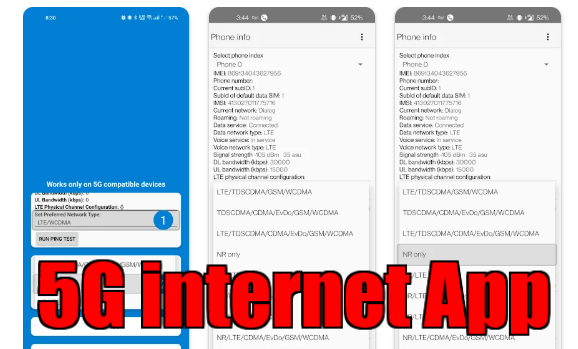
- Open the phone dialer
- Dial *#*#4636#*#*
- Select Phone Information
- Choose network type and select 5G Only or NR Only
Who Should Use 5G-Only Network Mode?
This mode is best suited for users who live or work in areas with strong and consistent 5G coverage. Tech enthusiasts,
Gamers and users who rely heavily on fast internet may benefit the most. For regular users who travel frequently,
Keeping the default network mode is usually safer.
Final Thoughts
5G Only Network Mode is a powerful option for users who want to experience the full potential of 5G technology.
However, it should be used wisely. If your area has reliable 5G coverage, enabling this mode can significantly
Improve your mobile internet experience. Otherwise, automatic network selection remains the better choice.
Click Hare… Play Store