WTMP — Who Touched My Phone? A Complete Review and Guide
In today’s digital world, smartphones have become an essential part of our daily lives. From personal conversations to sensitive data, everything is stored on our devices. This makes privacy and security more important than ever. One such application designed to enhance phone security is WTMP — Who Touched My Phone?. This app has gained popularity due to its unique functionality and user-friendly interface.
Introduction to WTMP
WTMP, short for “Who Touched My Phone?”, is an Android application that helps users monitor unauthorized access to their devices. Developed by Mindfulness Devs, the app is specifically designed to capture information about anyone who tries to unlock your phone without permission. It provides a sense of security and awareness, especially for users concerned about privacy breaches.
The app has received a strong rating on app stores, with millions of downloads and hundreds of thousands of reviews. Its popularity indicates that many users find value in knowing who attempts to access their device.
Key Features of WTMP
One of the main reasons behind WTMP’s success is its powerful and practical features. Below are some of the most important functionalities:
1. Intruder Detection
WTMP automatically detects when someone tries to unlock your phone. If the attempt fails, the app records the event and stores it for later review.
2. Photo Capture
The app uses the front camera to take a photo of the person attempting to unlock your device. This feature works silently in the background, ensuring that the intruder is unaware of being recorded.
3. Detailed Reports
WTMP generates detailed reports that include the time of the attempt, number of tries, and captured images. This helps users analyze suspicious activity easily.
4. Simple User Interface
The app is designed with simplicity in mind. Even users with minimal technical knowledge can easily navigate and use its features without difficulty.
5. Lightweight Application
Despite its useful features, WTMP is a lightweight app that does not consume excessive storage or system resources.
How WTMP Works
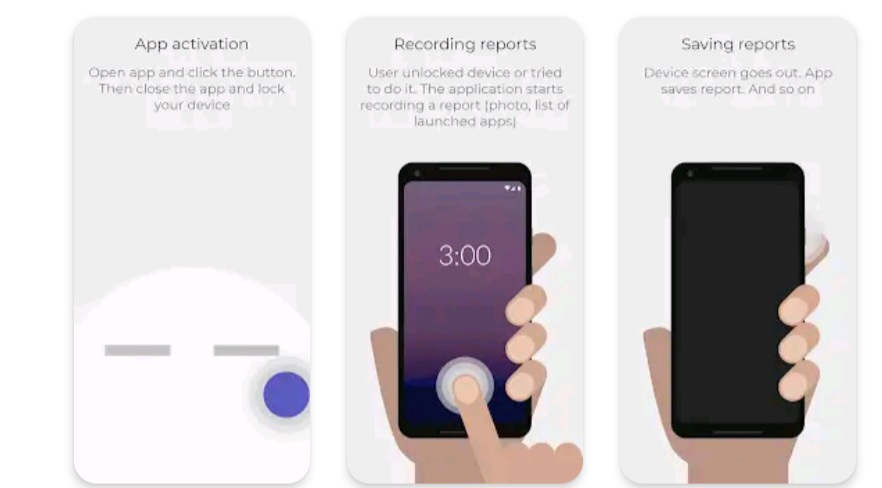
The working mechanism of WTMP is quite straightforward. Once installed, the user needs to activate the monitoring feature. After activation, the app runs in the background. Whenever someone tries to unlock the phone and fails, WTMP records the attempt and captures a photo using the front camera.
The app stores this information securely and allows the user to view it later. This process happens automatically, requiring no manual intervention once set up.
Benefits of Using WTMP
There are several advantages to using WTMP on your smartphone:
- Enhanced Security: Helps protect your personal data from unauthorized access.
- Peace of Mind: Knowing that any intruder attempt is recorded reduces anxiety.
- Evidence Collection: Captured photos and logs can serve as proof if needed.
- User Awareness: Keeps you informed about who is trying to access your device.
Limitations of the App
While WTMP offers many useful features, it also has some limitations:
- It only works after failed unlock attempts.
- Requires camera permissions to function properly.
- May not work effectively if the phone is turned off or battery is drained.
- Some advanced features may require in-app purchases.
Privacy Considerations
Since WTMP involves capturing photos and recording activity, users should be aware of privacy implications. The app requires permissions such as camera access and storage usage. It is important to review the app’s privacy policy and ensure that data is handled securely.
Users should also avoid misusing the app in ways that violate others’ privacy. It is intended for personal security and not for unethical surveillance.
Who Should Use WTMP?
WTMP is ideal for a wide range of users, including:
- Students who want to protect their phones from friends or classmates.
- Professionals who store sensitive work data on their devices.
- Anyone concerned about personal privacy and security.
Installation and Setup
Installing WTMP is simple. Users can download it from the Google Play Store and follow the on-screen instructions. After installation, granting necessary permissions is essential for the app to function correctly.
Once permissions are granted, users can activate the monitoring feature and start using the app immediately.
Conclusion
WTMP — Who Touched My Phone? is a practical and effective tool for enhancing smartphone security. With features like intruder detection, photo capture, and detailed reports, it provides users with valuable insights into unauthorized access attempts. While it has some limitations, its benefits outweigh them for most users.
In a world where privacy is increasingly important, apps like WTMP offer a simple yet powerful solution to keep your personal data safe. Whether you are a student, professional, or general user, this app can help you stay aware and protected.